Edit a guest’s details
Open a guest’s profile to set their sex and age, side, role, family, RSVP status, meal and more.
Every guest has a profile with what you know about them. The seating chart, the RSVP form and the exported lists all use these details.
Step by step
Step 1Open the guest’s profile
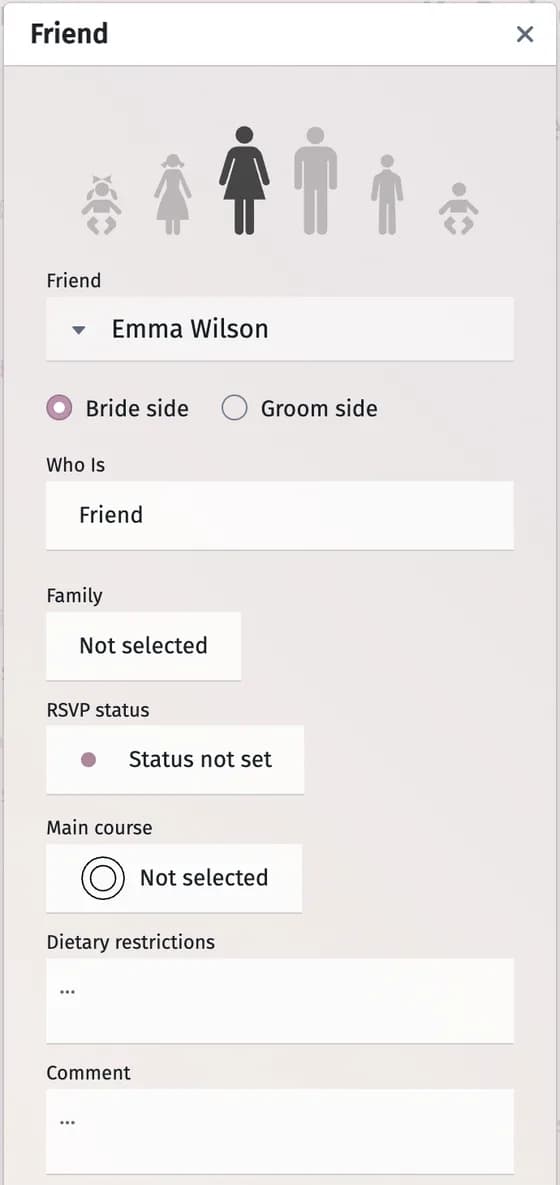
In the Guest List, click the small figure to the right of the guest’s name. The profile opens in a window titled with the guest’s role.
Step 2Choose sex and age
Click one of the figures at the top: an infant, a child or an adult, girl or boy, woman or man. The bride and groom can only be adults.
Step 3Fill in the details
- Name — with an optional form of address, such as Mr., Ms. or Dr., in the small menu before it.
- Bride side / Groom side — whose guest this is.
- Who Is — the guest’s role.
- Family — the household the guest belongs to. Family members can answer the RSVP together.
- RSVP status — whether the guest is coming.
- Main course — the meal for this guest. You set the choices in Settings → Main course options above the guest list.
- Dietary restrictions and Comment — free text.
- Flower Girl and Ring Bearer — switches for the children who have these roles.
- Appearance — the Skin and Attire colours of the figure that stands for this guest on the seating chart.
Step 4Close the window
Changes are saved as you make them. Close the window with the cross in its corner.
Tips and important notes
- Need more fields — an e-mail address, a table wish, a gift? Click Guests’ profile attributes and fields at the bottom of the profile to add your own fields or hide the ones you don’t use.
- There are no built-in fields for an e-mail address or a phone number. If you keep them in a field of your own or in the comment, the invitation tools can use them to send personal invitation links.
- Remove this guest at the bottom of the profile deletes the guest from the list.
Troubleshooting
- I don’t see Flower Girl and Ring Bearer.
- These switches are not shown for the bride and the groom.
- Nothing changes when I click.
- You opened a view-only link: the profile can be read but not changed.
Updated November 3, 2026