Explore more wedding ideas & advice
Wedding Software
for Brides
Explore
Our service has assisted tens of thousands of couples worldwide in planning their dream weddings!
Congratulations on your engagement!
Now it’s time to start planning your wedding, and we are here to guide you through every step of the way. We know future brides aren’t professional wedding planners, so we offer an online wedding planning assistant with useful tools to make the planning process easier.
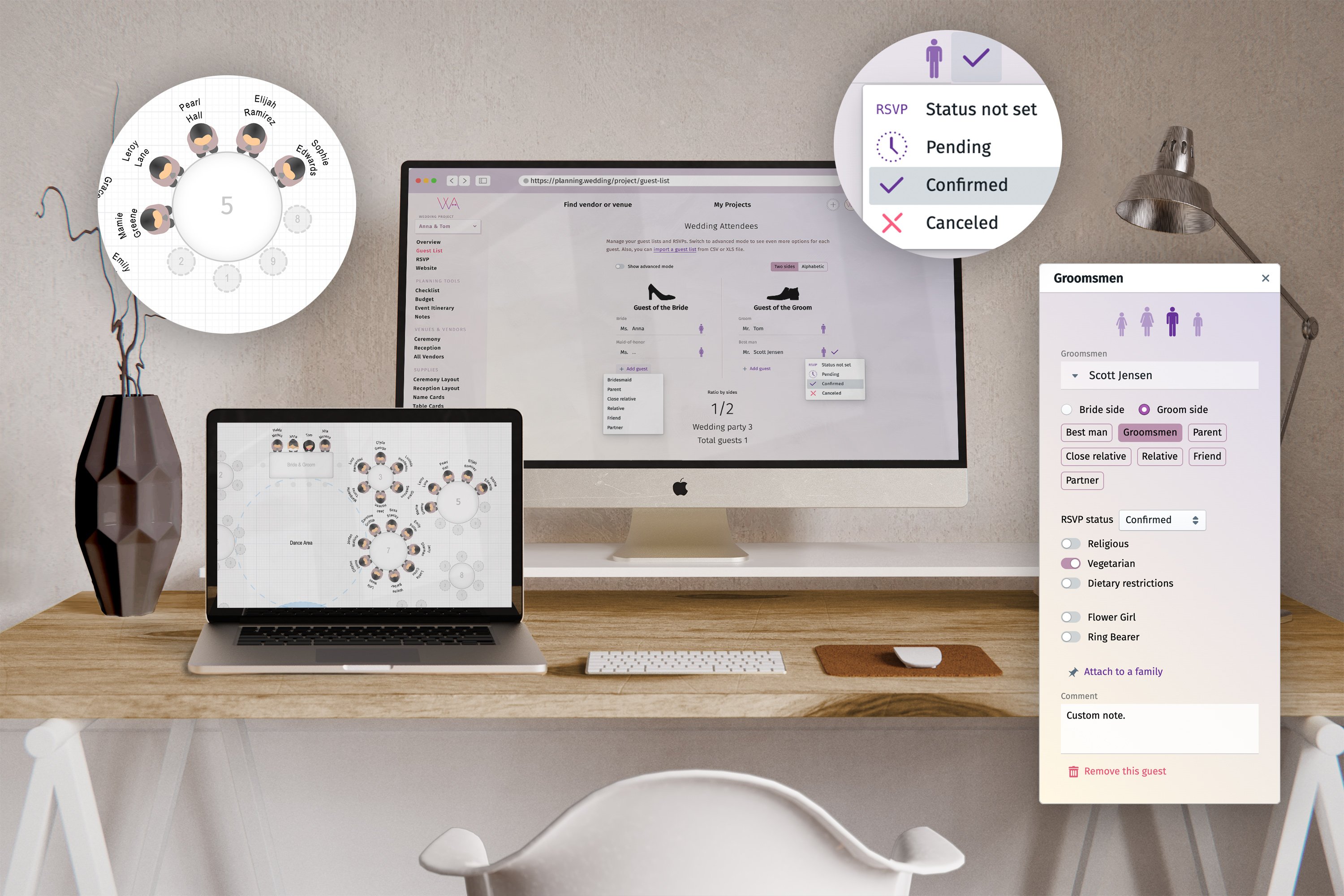
During your engagement, you should enjoy the sweet wait until your wedding day, instead of trying to figure out how to plan a wedding. With our online wedding assistant, software for brides is at your service: a guest list manager with AI import, a wedding website with RSVPs, a budget tracker, a checklist, your venues, ceremony and reception layouts with a seating chart, a day-of itinerary, stationery and more.
The friendly and easy-to-use software for brides makes it simple to organize everything about your wedding. You can start without an account: create a project, add your names and share it with your partner or bridesmaids by link; sign up whenever you want to keep it in your profile. Then build your guest list: type the names, or upload a spreadsheet, a text file or even a photo of a handwritten list and let AI import it.
Starting with the guest list will help you determine how intimate or large your wedding will be because, often, couples don’t realize they are planning a big wedding until they begin to write all the possible guests. Remember, you can adjust the list until the number fits your wishes and budget.
Your custom wedding planning environment
Planning.Wedding is a virtual workspace for the bride, the groom and everyone helping them: your families, your bridesmaids and, if you hire one, your wedding planner. Everything about your wedding sits in one project, and it can hold up to four checklists, budgets and timelines — for the wedding, the shower or the welcome dinner.
Wedding budget
Speaking of budget, our biggest piece of advice for engaged couples is to take a moment to set a wedding budget, preferably before picking a date and signing any contract. When you start your wedding plans, knowing your financial capabilities, you can make better decisions, hire wedding professionals who can adapt to your needs, and avoid starting your marriage with debt.
Creating a budget is easier than you think; start by checking your savings account and determining a number you can invest in your wedding without compromising your finances. Then check your monthly income and determine how much you can save after taking care of your fixed expenses. Multiply that number by the months remaining until your big day. Talk to your families in case they are contributing financially to your wedding, and ask them clearly to let you know the amount they are helping you with.
Easy right? Now you know your wedding budget, you are ready to use our budget tool, where you can set the total budget and keep track of every single expense. If you are a bit lost in terms of how many vendors you need to hire or if you are considering everything for your celebration, the budget tool is very helpful because you will see a list of the most common wedding expenses, and you can add how much you must pay for each of them. You can also add different categories or items to customize the experience.
Checklist
A checklist, so you remember the little details. In addition to helping you set your budget and finalize your guest list, a wedding planner usually has a checklist with a timeline so you can plan the wedding of your dreams on time and in an organized way. Your online wedding assistant has that same feature, but you can use it from the comfort of your home; the interactive checklist lists tasks you should accomplish in a certain timeline. For example, 4 months before your big day, you need to find a venue, set a budget, create a guest list, and find your photographer, among other tasks. Each task has a subtask with specific actions you must take to complete it, like what a wedding planner does, which is follow up.
Your wedding budget tracker and wedding checklist are two of the most valuable tools you can find to organize a wedding, especially when you are short on time and need guidance. But suppose you want to go even deeper into the wedding planning process. In that case, our wedding planning assistant has ceremony and reception layouts so you can visualize the space and even set seating charts to organize your guests.
Ceremony and reception layouts
Ceremony and reception layouts are sometimes included in your wedding venue services. Still, if not, or if you plan to host a wedding at a private property or home, you can draw your ceremony and reception layouts with custom room sizes, different table shapes, rows of chairs and the space between them. When your guest list is ready, automatic seating fills the tables for you and seats each family together whenever a table has room; then fine-tune by dragging guests onto seats. The free plan holds up to 5 tables per seating chart (and 3 rows of chairs at the reception); larger charts come with Premium.
Stationery and sharing
Wedding stationery can also represent a hassle for many couples, from finding the right vendor to creating designs they love. Our online wedding assistant is here to help: design table numbers, table seating cards, place cards, reception menus, a welcome sign and a wedding program, all built from your guest list and seating chart, and preview them for free. Change the fonts, sizes and details to personalize each one. The print-ready PDFs of your wedding stationery come with Premium, a one-time payment per project, not a subscription.
And don’t worry about doing all this by yourselves: copy the link to your project and your partner, friends or family can join in, with full access or view only. Your guest list, budget, checklist and timeline export to PDF or XLS for free, and your notes to PDF, if you like to keep your plans on paper too; the print files of the seating chart and the stationery come with Premium.
Wedding website
Our software for brides is easy to use, and if you want everything for your wedding in one place, we have you covered. The wedding website builder is one of the most useful tools: add your wedding details, reorder the sections, share the site with a QR code, and collect RSVPs through a personal link for every guest. Premium adds template changes, advanced theme settings, more language versions, music, password protection and a custom domain.
A wedding website helps you communicate with your guests: share the location of your ceremony and reception venues, the dress code, your gift registry details and your FAQ. But one of the most useful wedding planning tools is the RSVP form: every guest gets a personal invitation link or QR code and confirms attendance right on your wedding website, and the answers arrive as requests you accept into your guest list.
Wedding vendors
Our main purpose is to provide software for brides that makes the wedding planning process easy; that’s why we built a database with professional and experienced wedding vendors so you can not only manage all your wedding-related information through our online wedding assistant but also find the top wedding vendors near you. And in case you already have your ideal wedding vendors, you can add them to your wedding project.
You can even help us provide more options for engaged couples by inviting your vendors to join our platform.
More useful tools
Some of our favorite wedding planning tools include the Event itinerary, which helps you organize the hour-by-hour activities of your big day. Start from the moment you wake up, so when the time to say I do comes, you are ready. If you are unsure what you should be doing, we have a template considering the most common wedding day activities, and you can change the time if you wish or add those we missed. When you are done, you can download and print it to share with your loved ones so everyone keeps up, especially your bridesmaids, groomsmen, and family.
There is also a notes section where you can write freely whether you want a space to write to-do lists, thoughts, or even your wedding vows. It is a space you can use as you wish, and you can download the file once you are done to print it and have it with you or share it.
A post-wedding section comes in handy to add photos from your wedding and share them with everyone. Your wedding photo album holds 30 photos for free, or 1,000 with Premium, and guests can add their own photos through a link or a QR code. You won’t miss a moment by having your guests capture every step of your celebration.
Our wedding software for brides has it all: you don’t need a separate host for your wedding website, a printable checklist, a budget app or an expert to draw a seating chart. You do it all in one project, and its overview page draws your venues, checklist progress, budget and wedding day on one picture. The same project opens in our apps for iPhone and iPad and Android, so you can plan wherever you are and share it all with the people you love.
Let’s get started
Why plan your wedding in one online project
Plan together
Plan together with your partner, your mom or your maid of honor in real time: share one link, no account needed. Every change is saved and synchronized in your one wedding project.
Export and share
Need it on paper? Export your guest list, budget, checklist and timeline to PDF or XLS at any step, or send your family a view-only link to the project.
Web, iPhone and Android
Your project is stored in the cloud and opens in the browser and in our iPhone and Android apps, so the guest list you edit on your phone is the one your partner sees on a laptop.
Every tool in your wedding project
Guest list
Add guests by hand or let AI import them from a spreadsheet, a text file, pasted names or a photo of a list; mark sides, families, meals and dietary needs.
Wedding Guest List →RSVP
Every guest gets a personal link to the RSVP form on your website; their answers and meal choices arrive as requests you accept into the guest list.
Wedding RSVPs →Wedding website
Build a wedding website with your story, the details of the day, venues, dress code and FAQ, then give every guest a personal invitation link or QR code to RSVP.
Wedding Website →Checklist
Keep track of every task leading up to the big day, with subtasks — and up to four checklists in one project!
Wedding Checklist →Budget
Stay on top of your spending: track your total budget, prices, deposits and outstanding payments, and see them all on a chart.
Wedding Budget →Event itinerary
Plan your wedding day down to the minute, from getting ready to the last dance, and print it for your wedding party.
Wedding Itinerary →Vendor search
Great vendors make the big day. Search our directory for wedding vendors near you, and keep the contacts of the ones you hire in your project.
Find Wedding Vendors →Venues
Keep your ceremony and reception venues in one place: addresses, dates and times, the weather forecast and the expected number of guests for each.
Find a Wedding Venue →Ceremony Layout
Draw the plan of your ceremony with the layout tool: rows of chairs, decorations and the space around them, and see who sits where.
Wedding Seating Chart →Wedding photos
Collect your guests’ photos in one album through a link or a QR code: 30 photos for free, 1,000 with Premium.
Wedding Photos & Album →Reception layout
Visualize your reception from the layout down to each seat, and let automatic seating fill the tables for you; the free plan holds 5 tables.
Reception Seating Chart →Table cards
Use your reception layout to name or number your tables, then print them with Premium.
Wedding Table Numbers →Name cards
Use your guest list and reception layout to generate name cards for assigned seats automatically, then print them with Premium.
Wedding Place Cards →Reception menu
Create custom menus for your reception, including religious, vegan, and special diets!
Wedding Menu Cards →Notes
Use this tool to write down any text you might need on the big day. Notes, speeches, vows - if you need to remember something, put it here!
PLANNING . WEDDING — is easy to remember and even easier to use.
Wedding Planning Software
Planning.Wedding is a planning tool that brings together couples getting married and professional wedding vendors all over the world.
We are building a truly international community in the wedding industry, in 38 languages.
Planning.Wedding has two sides — one for couples, and one for vendors. Anybody planning a wedding can take advantage of the easy-to-use interface that breaks wedding plans down into individual task checklists. From the guest list to the seating chart, everything is covered. There are many useful tools such as a guest list with AI import, RSVP management, a wedding website builder (more templates with Premium), a budget tracker, a table layout builder with automatic seating, a wedding day itinerary, vendor contacts and more.
Finding a venue and vendors is easy! All it takes is a search in our global directory if a couple wants to find a vendor. To become listed, vendors complete a business profile, and that’s it! Once a vendor is listed, couples can see their profile, portfolio and reviews and contact them directly. When you hire one, add them to your wedding project to keep their contacts and notes in one place.
Wedding Planning Tools
Planning.Wedding keeps the whole wedding in one project: the guest list and RSVPs, seating chart, wedding website, budget, checklist, timeline and stationery — whether you’re organizing everything yourself or working hand-in-hand with a wedding planner or coordinator.