


Explore more wedding ideas & advice
Wedding Seating Chart Sign Template
Explore
Our service has assisted tens of thousands of couples worldwide in planning their dream weddings!
Wedding Seating Chart Sign Template — Editable, Auto-Filled, Free to Build
A wedding seating chart sign template turns the chore of typing 100+ guest names into one export. The template handles the layout, the alphabetical order and the columns; you seat your guests on the seating chart, and the sign fills itself in, ready to send to a printer.
This page is about the template for the physical poster on an easel at the entrance, NOT the floor-plan template at seating chart template. For the alphabetical sort logic, see alphabetical seating chart sign. For 15+ design ideas, see seating chart sign ideas.
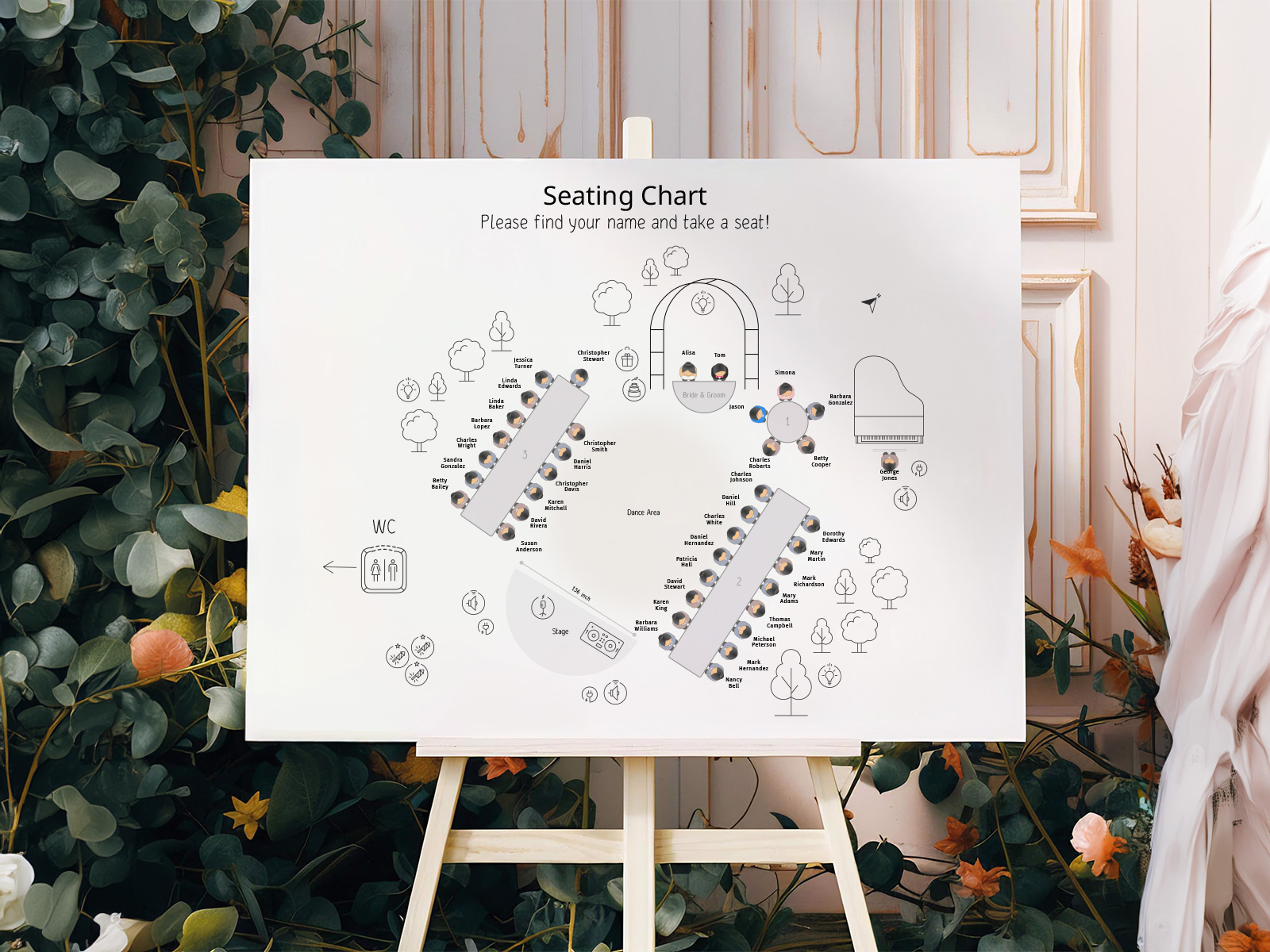
Names come from your seating chart project — the template doesn't need a separate names list, it pulls from the live floor plan.
Coordinate the template's typography with the rest of your wedding day-of stationery for one consistent look across the room.
Confirm attendance through RSVP first and seat only the guests who are coming: the sign lists exactly the guests seated on your chart.
PLANNING . WEDDING — is easy to remember and even easier to use.
How the Template Works — Names From Your Project, Format Your Choice
The template is a generated view of your project. You don’t fill in names; the project does. You pick the orientation, the columns and the typography, and the export does the rest.
- Build your seating chart with the drag-and-drop floor plan and assign every confirmed guest to a table.
- Open Supplies → Alphabetical Guest Atlas in the project.
- Pick the display mode — alphabetical (the default, best for 80+ guests) or grouped by table.
- Pick the orientation: portrait or landscape on an A1 page. The file is vector, so the print shop can scale it to A0 or fit it to 18×24 or 24×36 with a slim margin; on a 16×20 sign, which is squarer than A1, blank margins remain on two edges.
- Customize the layout — column count, fonts, the heading lines (“Please find your seat!”, the date, your names) and any text you add.
- Check the preview on screen: every name and table number, and whether the type will still read from a distance at the size you print.
Elegant wedding seating chart
Seat your guests — the template fills itself
Sizes Cheat Sheet — 16×20 vs 18×24 vs 24×36
Sign size scales with guest count and the entrance space. Our file is a vector page in A1 proportions (an A1 sheet is 23.4×33.1 in) that a print shop can scale to the sizes below; pick the smallest one at which every name stays legible from arm’s length.
- 16×20 inches — the smallest practical wedding sign, best at intimate weddings (under 50 guests) or venues with a tight entrance. Two columns, generous spacing. It’s squarer than A1, so the shop fits the file with blank margins on two edges.
- 18×24 inches — a common sweet spot for 50–80 guest weddings. Three columns, comfortable line height, fits most easels.
- 24×36 inches — the standard for 80–150 guest weddings. Three or four columns, large display font, reads from across the entrance.
- Larger formats — A0 (33.1×46.8 in) or two 24×36 signs side by side at 150+ guests. Below 18pt body type, the back of the queue can't read it.
Template Customization Options
Every part of the layout is editable in the sign’s settings, and the names always come from the project.
- Text on the sign — it starts with “Please find your seat!” and two lines for the date and your names. Edit them right on the canvas with a double-click, move them, or add your own lines, such as “Welcome” or a short quote.
- Display mode and names — alphabetical or by table, letters grouped by last or first name, and names printed as First Last, Last, First, or first name only.
- Columns and spacing — let the sign pick the column count automatically, or set it yourself (1 to 10), along with the column gap, the space between letter blocks and the space between names.
- Type — one font and size for the letter headings, another for the names, plus an optional dotted line from each name to its table number. Pair calligraphy with a clean serif for formal weddings, or a sans-serif for minimalist ones.
File Output — Print-Ready PDF
The export is a vector PDF on an A1 page, portrait or landscape, with the fonts you picked. Vector means the names stay sharp whether the shop prints it at A1, scales it to A0, or fits it to 24×36. Open it on any computer to proof every name before it goes to print.
Hand the PDF to any local print shop for foam board, poster paper or acrylic mounting. If the shop wants a bleed margin, ask them to add it, since the file ends at the page edge. The PDF download is part of Premium: $29 once per project on the web, not a subscription.
Try the template — no sign-up needed
Editing Flow Within the Platform
The template is part of your seating chart project, so there’s no separate editor to learn. Open Supplies → Alphabetical Guest Atlas, adjust the orientation, columns, fonts and text, check the preview, and export the PDF.
If you re-arrange the floor plan or update guest list information later, the template re-reads the data automatically. No re-typing, no re-saving, no version drift between the names in the project and the names on the sign.
Why Live-Data Templates Beat Static Ones
Etsy and Canva templates produce a single design you fill in by hand for every guest. For 100 guests that's 100 manual edits, plus another round of edits every time an RSVP changes. Our template treats the sign as output — the data lives in the project, the template reads it, and the export is automatic.
The difference shows in the final week before the wedding. Static templates require re-typing every changed name; live-data templates regenerate themselves. Building and previewing are free, the PDF is Premium at $29 once per project, and the names stay in sync with your place cards and table numbers — no more “did I update the master list?” anxiety.
Explore the rest of the wedding seating chart sign cluster
Each sub-page below covers a narrow slice of the alphabetical entrance poster — sort variations, design templates, and 15+ creative ideas — all powered by the same Wedding Planning Assistant seating chart project.
Explore the rest of your wedding day-of stationery suite
Every item below is made in your Planning.Wedding project: the sign and the cards take names and tables from your guest list and seating chart, so one update reaches each of them, and the menu is designed right beside them. The same project holds your RSVPs, wedding website, budget, checklist and timeline.