Hide the tools you don’t use
Switch off planning tools you don’t need so the menu shows only what you use.
Step by step
Step 1Open Services Visibility
In Settings, scroll to Services Visibility.
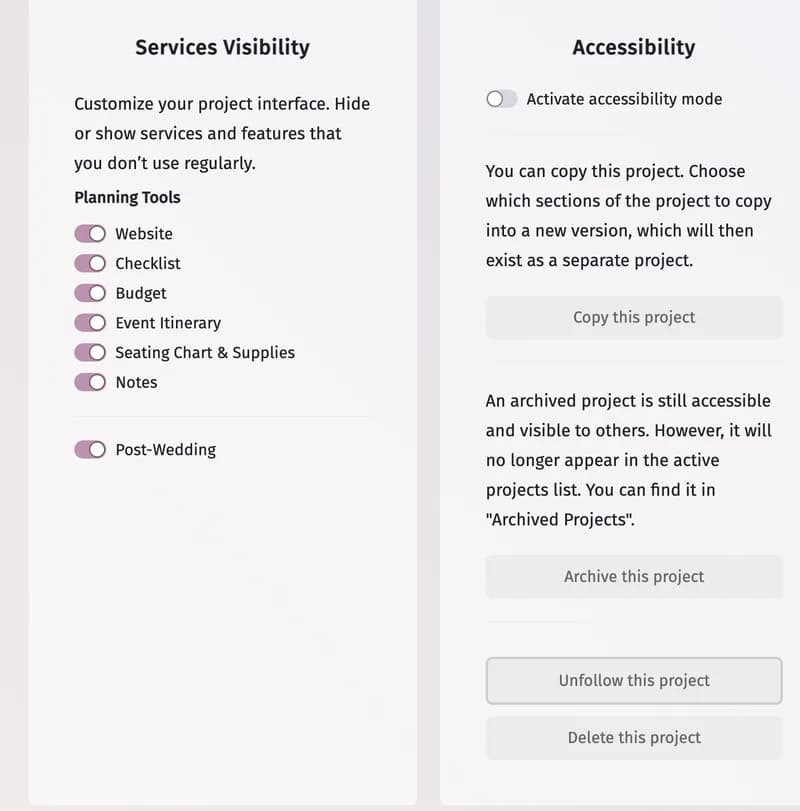
Step 2Switch tools off
Switch off any of Website, Checklist, Budget, Event Itinerary, Seating Chart & Supplies, Notes and Post-Wedding. It disappears from the menu at once — for everyone in the project.
Tips and important notes
- Switch it on again to bring the tool back; nothing in it is lost.
- Overview, Guest List, Venues, All Vendors and Settings are always shown.
Updated November 3, 2026