Welcome sign
Make a welcome poster for the entrance with your names and the date.
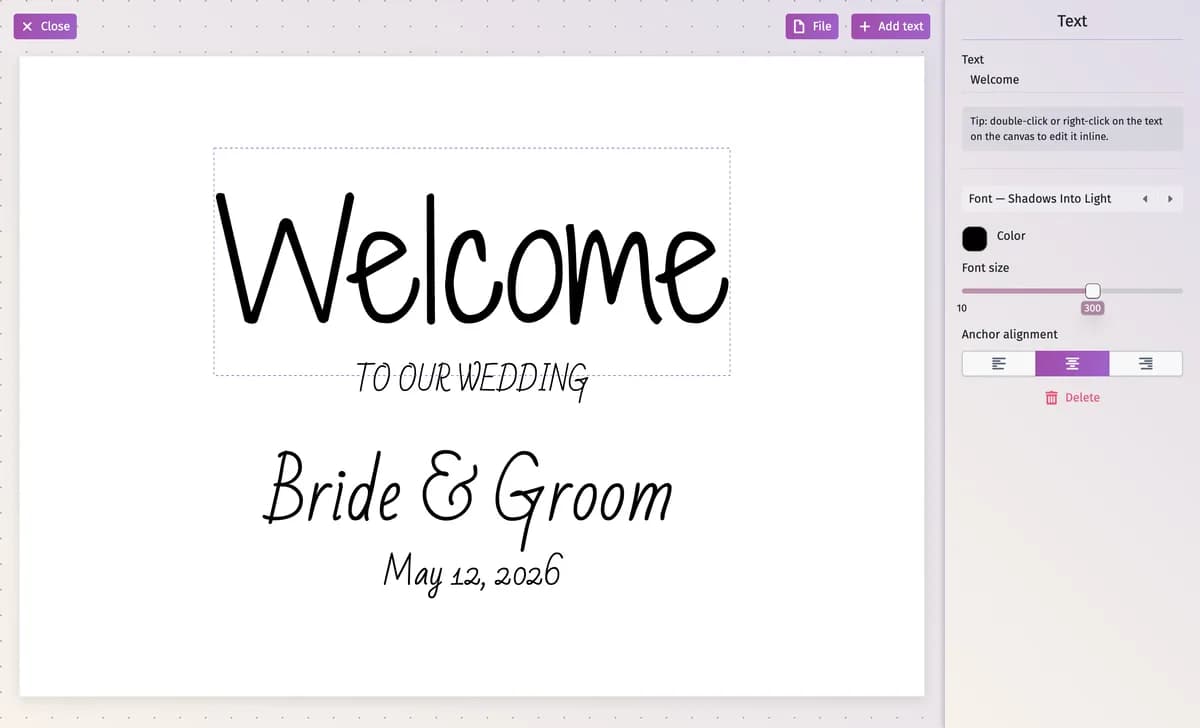
Welcome Sign is a poster for the entrance. It starts with example words — “Welcome”, “To our wedding”, “Bride & Groom” and a date — that you replace with your own.
Step by step
Step 1Add the welcome sign
In Seating Chart & Supplies, under the reception chart, click + and choose Welcome Sign (a new project doesn’t have one yet). Then click Click here to edit layout.
Step 2Change the texts
Click a text on the poster. The panel shows its Text, font, Color, Font size and alignment, and a button to delete it. Double-click or right-click the text to type right on the poster; drag it to move it.
Step 3Add more text
Add text offers four styles: Hero, Couple names, Date / Subtitle and Caption.
Step 4Turn the poster
Click an empty spot to see Poster settings and switch the Orientation between Landscape and Portrait.
Step 5Download
File → Download PDF file (Premium). File → New Layout empties the poster after you confirm.
Tips and important notes
- The sign doesn’t fill in your names or the date from the project — type them yourself.
- Adding, renaming and deleting stationery: Stationery from your seating chart.
Updated November 3, 2026